
Snapsight Remix is a powerful new feature in Snapsight that transforms your project data into beautifully branded reports, presentations, and social media assets. With built-in brand customization and flexible filtering options, Remix helps you create professional, on-brand content in just a few clicks.
Whether you need a quick one-page summary, a detailed brand report, or ready-to-share marketing assets, Snapsight Remix simplifies the entire workflow.
How to Access Snapsight RemixGetting started with Remix is simple:
- Open the project you have created in Snapsight.
- From the left-side toolbar, click Remix.
- You will be taken to the Remix workspace, where you can configure your brand and generate reports.
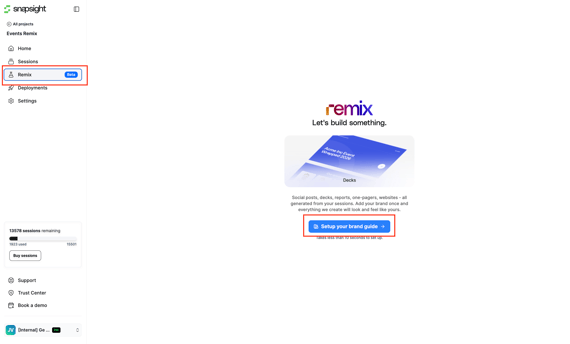
Before generating any reports, it's recommended to create your Brand Guide.
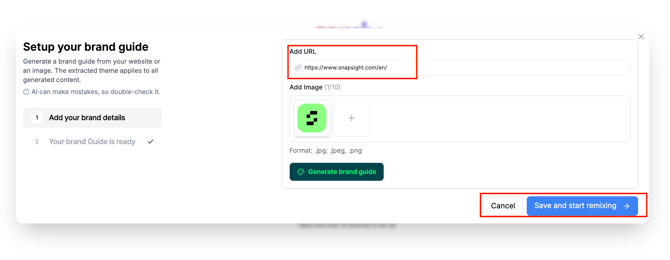
- Click Brand Guide in the top-right corner.
- Add your:
- Website URL
- Brand logo
- Click Generate Brand Guide.
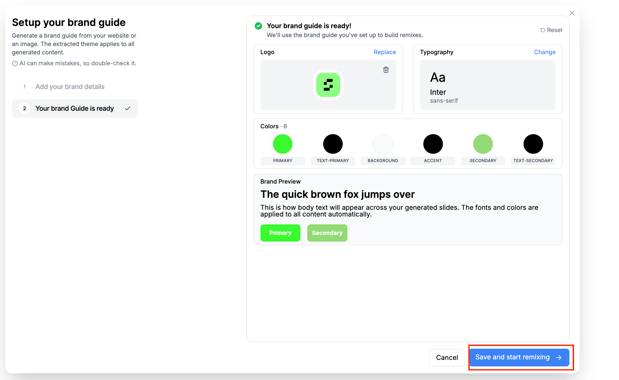
Snapsight will automatically analyze your brand and generate a comprehensive Brand Guide, including your visual identity.
Once the Brand Guide is generated, you can:
- Save it as generated, or
- Customize elements such as:
- Logo
- Typography
- Brand colors
These settings will be used across all reports and creative assets generated through Remix, ensuring a consistent brand identity.
Remix allows you to build reports using the exact data you need.
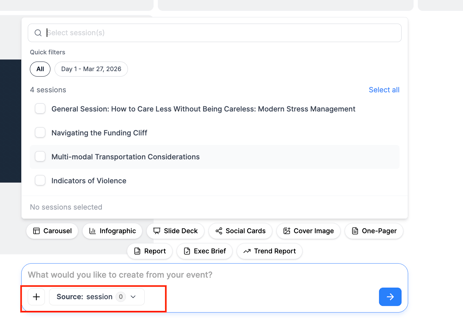
Using the Source option below the prompt area, you can filter your project data based on:
- Date range
- Sessions
- Locations
These filters allow you to focus on specific events, time periods, or locations before generating content.
After selecting your data source and filters, Remix can generate multiple types of branded content, including:
- One-page reports
- Brand reports
- Social media assets
Each output is automatically styled using your Brand Guide, creating professional and visually consistent deliverables.
Step 4: Edit and CustomizeAfter a report has been generated, you have complete control over the final output.
You can:
- Click Edit in the top-right corner to manually modify the content.
- Use prompts to request specific changes or customizations, allowing Remix to regenerate or refine the report according to your requirements.
This AI-assisted editing makes it easy to tailor reports for different audiences or use cases without starting from scratch.
Step 5: Download Your ContentOnce you're satisfied with your report or creative asset, click Download to export it in your preferred format.
Supported export formats include:
- Markdown
- Image
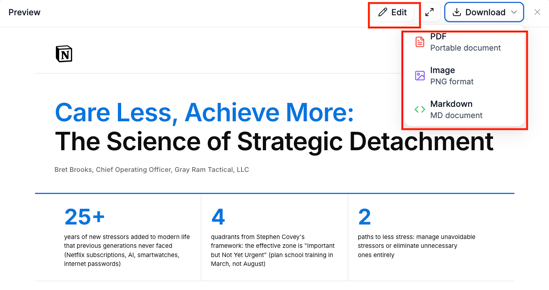
This flexibility makes it easy to share reports with stakeholders, publish them online, or use them in presentations and marketing materials.
Why Use Snapsight Remix?Snapsight Remix streamlines the process of turning project insights into polished, branded content. By combining intelligent report generation, customizable branding, flexible data filtering, and AI-powered editing, Remix helps teams create professional deliverables in minutes instead of hours.
Whether you're preparing client reports, internal summaries, or marketing content, Snapsight Remix enables you to produce high-quality, brand-consistent assets with minimal effort.