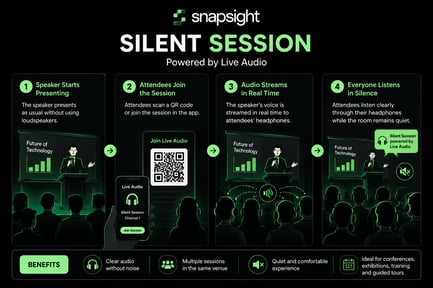
Snapsight has introduced a new Live Audio feature that allows attendees to listen to a speaker's audio in real time. Before using this feature, it must be enabled and configured within the project settings.
Step 1: Enable the Live Audio FeatureTo get started, ensure that your project setup has been completed. Then:
- Open Settings.
- Navigate to Experience.
- Enable the Live Audio Translation feature.
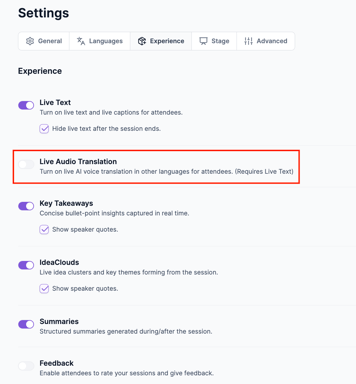
After enabling Live Audio Translation:
- Go to the Languages section.
- Under Live Audio Translation Languages, select the language or languages you want to make available.
- Click Save to apply your changes.
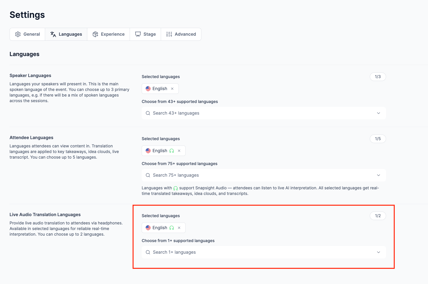
Once your settings have been saved, the Live Audio feature is ready to use. Attendees can access the Experience through their attendee link and listen to the speaker's live audio directly in their selected language, providing a seamless and accessible listening experience.
Example Use cases:
Silent Sessions allow attendees to listen to a speaker through headphones instead of loudspeakers. The speaker's audio is streamed in real time using the Live Audio feature, creating a quieter and more focused experience. This is especially useful in venues with multiple simultaneous sessions or where noise needs to be minimized.
Example 1: Multi-Track Conference
A conference hosts three presentations in the same open hall. Each speaker broadcasts their audio through Live Audio on a separate channel. Attendees join the session of their choice and listen using headphones, allowing multiple talks to take place without interfering with one another.
Example 2: Museum or Exhibition Tour
A guide explains exhibits to visitors while walking through a gallery. Instead of speaking loudly, the guide streams audio through Live Audio. Visitors wear headphones and hear the guide clearly, even in crowded or quiet environments, without disturbing other guests.