
The Resources option is available within the Summary editor. It allows you to attach additional materials to a session so attendees can access them easily.
Supported resource types
- Video
- PPT
- Link
Note: All resources must be added as links (URLs).
How to Add Resources
Step 1: Open the session
-
- Go to Sessions.
- Click the session title to open the session management page.
Step 2: Go to Summary section
-
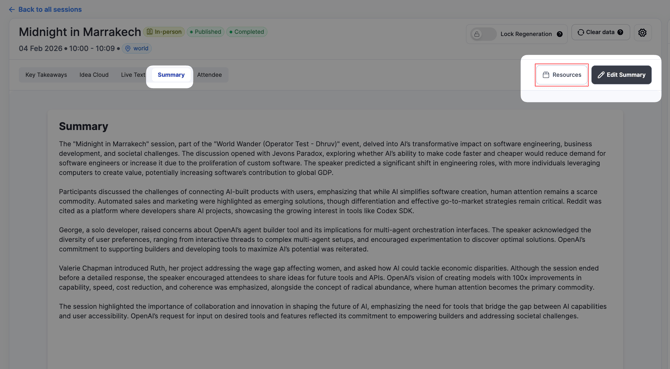
- In the session management page, locate the Summary section.
- Click Summary to open it.
Step 3: Open Resources
-
- Next to Edit Summary, click Resources.
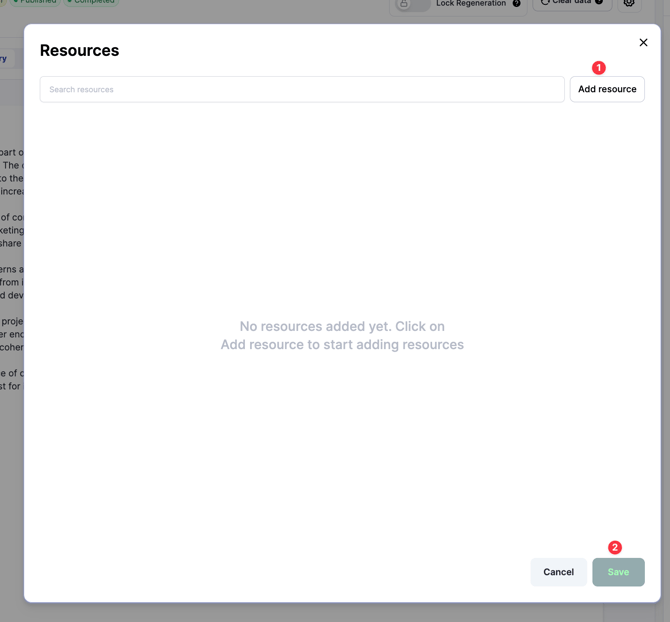
- A pop-up will appear.
Step 4: Add a resource
-
- Select the resource type (PDF, Video, PPT, or Link).
- Enter a Title for the resource.
- Paste the resource link (URL).
Step 5: Save
-
- Click Save (bottom-right of the pop-up).
- The resource will be added and visible to attendees on the session page.
Need Help?
If you need assistance adding session resources, contact the Customer Success team at cs@snapsight.com